
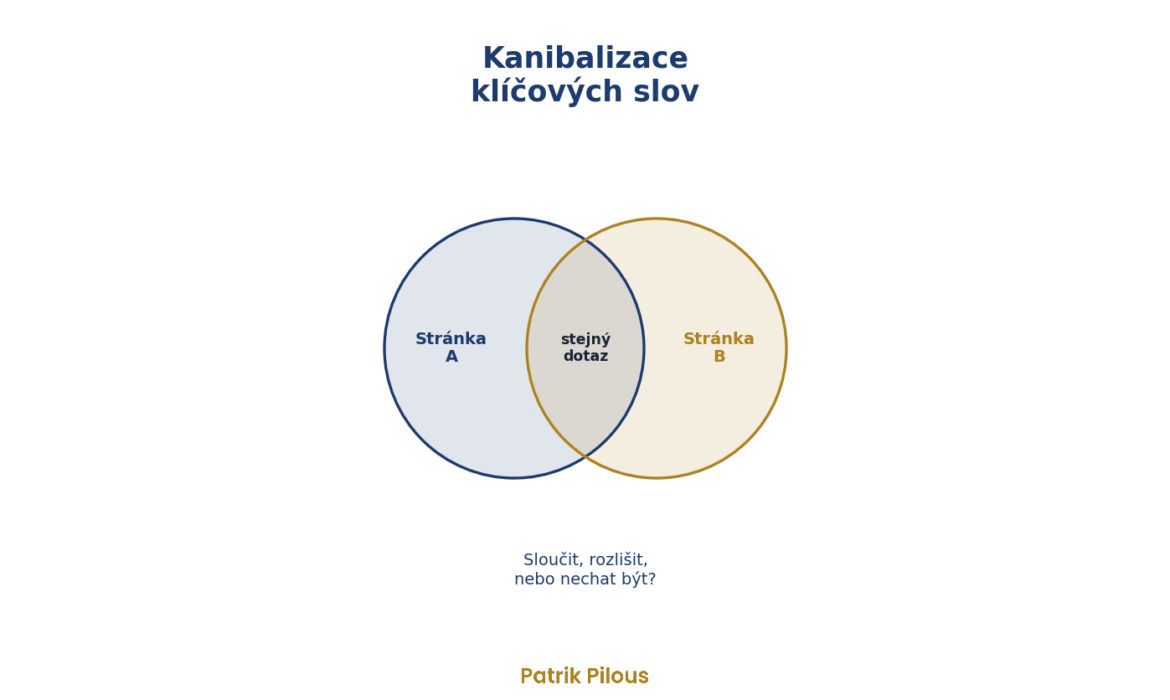
Keyword cannibalisation happens when two or more pages on the same website target the same query with the same intent, and Google switches between them. As a result, none of them ranks as well as it would on its own. The key part is the same intent. Several pages on one query are not cannibalisation in themselves.
A common piece of advice is to merge everything that meets on the same query. But that is an easy way to break your website, because along with the weaker page you also lose the answer to a question people really ask.
Two pages on one query are not yet cannibalisation
Real data from a pool chemicals e-shop I work with (Search Console, 14 June to 11 September 2026). For the query “chlor šok” (shock chlorine), two pages mainly appear: the category with products and an article on how to dose shock chlorine.
| Page | Impressions | Clicks | Position |
|---|---|---|---|
| Shock chlorine category | 15 864 | 84 | 4,1 |
| Article on dosing shock chlorine | 9 460 | 26 | 9,9 |
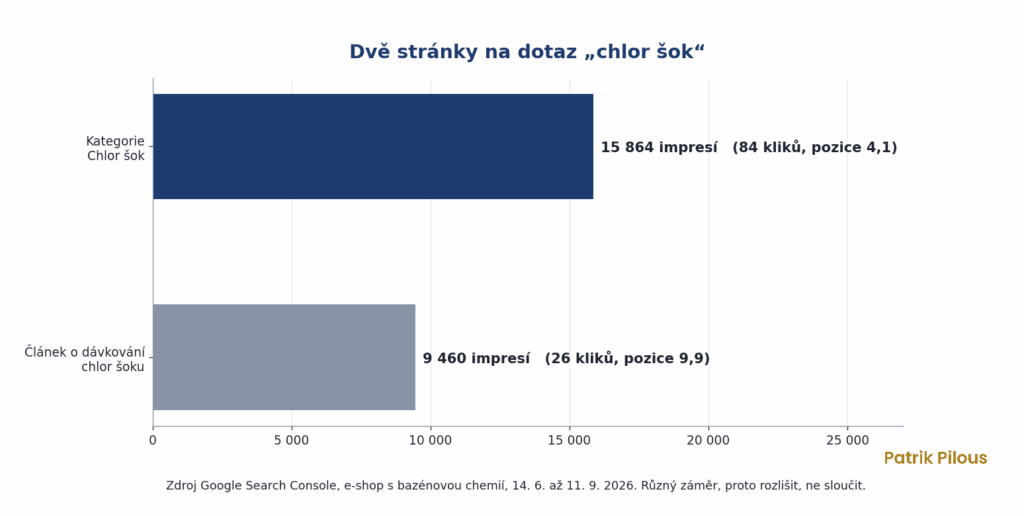
Is this cannibalisation? According to the data it looks like it, as the article takes 37% of the impressions these two pages received for the query. According to intent, it is not. Someone who wants to buy shock chlorine belongs on the category page. Someone who doesn’t know how much to put in the pool belongs on the article. (The low click-through rate of the category in fourth position may have several causes. For purchase queries, though, there is often a product block above the results that takes some of the clicks.)
Merging them would cost the e-shop one of its answers. The right step is to differentiate. The article already has dosing in its title, just at the end. It is enough to move it to the beginning and leave the main query “chlor šok” to the category, so Google doesn’t have to choose.
The same goes for a query on the e-shop’s name. The homepage, contact page and main categories all appear for it, and that is completely normal. Here, multiple URLs simply mean that Google is showing the website as a whole, which is why I exclude branded queries when looking for cannibalisation. Semrush sees it the same way in its guide: according to it, several pages on one query do not automatically mean cannibalisation.
Does Google penalise cannibalisation?
No, at least not in the way people often say. Google does not penalise a website for similar pages, it just chooses between them. And it doesn’t always choose the one you would want.
Google has been saying this for a long time. Back in 2008, Susan Moskwa wrote on Google’s webmaster blog that there is no penalty for duplicate content, at least not in the way most people imagine it. Google picks one of the similar pages and shows it.
“There’s no such thing as a duplicate content penalty.”
Susan Moskwa, Demystifying the “duplicate content penalty”, Google Search Central Blog, 2008
In September 2025, Google’s John Mueller added that pages are not duplicates just because they appear in the same search results (Search Engine Journal). And according to Google’s documentation, a canonical is only a hint, not a rule, so Google may choose a different page from the one you mark.
So why deal with it? Because the cost is not a penalty but a split. Clicks and links are divided between two pages, so neither collects everything it could have on its own. And when Google also alternates the pages, both position and click-through rate fluctuate, making it hard to read from the data what is actually working.
How to find cannibalisation
The quickest way is Search Console. The process for one query takes a few minutes and you don’t need any paid tool.
- In the Performance report, click Add filter, choose Query and enter the exact query you want to check.
- Switch to the Pages tab (in the Czech interface, impressions are listed there as Zobrazení).
- Set the period to the last three months, as a shorter window shows more chance than trend.
- If several URLs appear and the weaker one has at least 5% of impressions, you have a candidate. Note down each page’s share of impressions.
For hundreds of queries at once, tools that run through this automatically are useful. I use Marketing Miner, which tracks the search results themselves as well as Search Console data. You can also pull the same data via the Search Console API into a spreadsheet if you want the query and page dimensions side by side.
To avoid chasing noise, I stick to working thresholds. Data from the last 90 days, a query with at least 30 impressions, and the weaker page must have at least 5% of the query’s impressions. I exclude branded queries, otherwise they flood the whole report. In the query filter, simply choose a custom regular expression, set it to queries that don’t match, and enter variants of the brand name with and without diacritics, separated by a vertical bar.
Switching is stronger evidence than sharing
Shared impressions point to a candidate, switching over time confirms it. For each query, Marketing Miner shows how many times the page Google displays has changed recently. For a women’s fashion e-shop, in August 2026 it found a total of 304 queries with a combined 38,520 searches a month for which several pages ranked. For “baggy kalhoty” (baggy trousers), the pages swapped 108 times in its tracking, with 830 searches a month. Google simply cannot choose there (I take the tool’s number with a pinch of salt, as it depends on how often it measures, but the direction is clear).
| Number of swaps | How to read it |
|---|---|
| 0 to 3 | stable, Google has chosen |
| 4 to 15 | fluctuating, worth a look |
| 16 to 50 | serious, Google keeps swapping |
| over 50 | decide now, rankings are being lost here |
The thresholds in the table are my working ones, not a Google rule. A swap means that between two measurements, Google showed a different page of the website for the query than before.
Without a tool, you can also spot switching in Search Console. Keep the query filter, add a filter for page A and look at the impressions chart. Then do the same for page B. The chart shows days, which are too erratic, so look at whole weeks. If one line drops in exactly the weeks when the other rises, Google is most likely alternating them. To be sure, also look at the whole query without the page filter. If total impressions stay similar and only the page receiving them changes, it is switching, not a fluctuation in demand.
Intent decides, not the slug
For every pair of pages, I ask whether they target the same intent. The page type helps. Categories, products, articles and filters each have a different role, and only some combinations are a real problem.
| Page combination | Intent | Default verdict |
|---|---|---|
| Category and category | same | cannibalisation |
| Category and a filter of the same category | same, if the filter targets the main query | differentiate |
| Category and article | usually different | fine, if the titles distinguish the intent |
| Product and its variant | same | cannibalisation |
| Two articles on the same topic | same | cannibalisation |
| Product and category | different | fine, watch internal linking |
When I’m not sure, I open both pages and compare the title and H1. Guessing from the slug doesn’t pay off, as the URL was often created long ago and no longer says anything about the content. I write more about how to recognise intent in the article Search intent.
What to do about it
There are four options, and only one of them is merging. The choice depends on how the pages share impressions and whether they target the same intent.
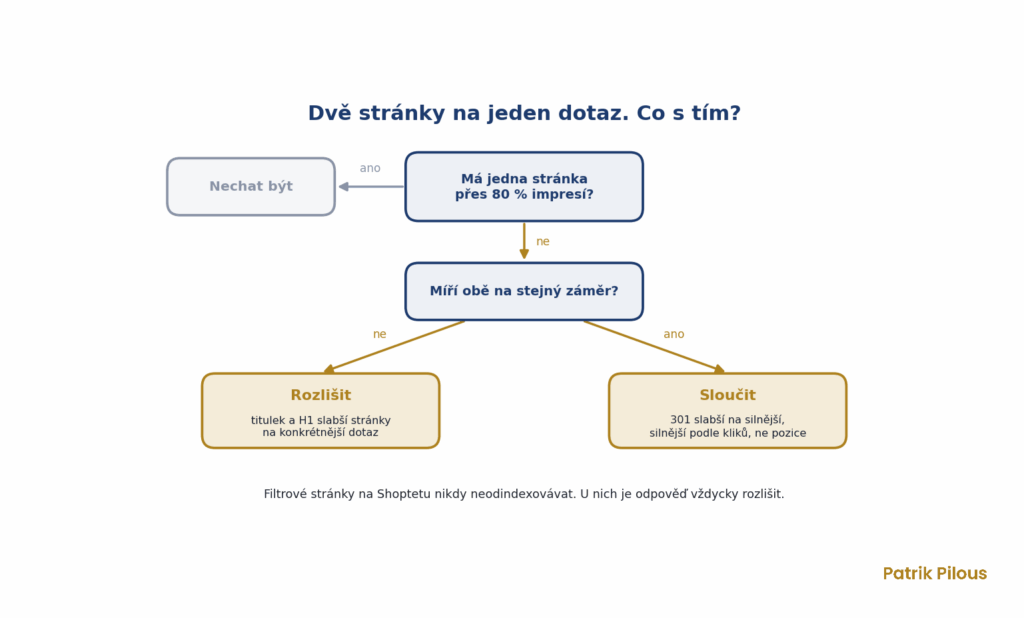
- Leave it. One page has more than 80% of impressions and doesn’t alternate. Google has chosen, there is nothing to fix.
- Merge. Same intent, the pages split roughly half and half and both are beyond the top ten results, or they swap frequently. Point the weaker page to the stronger one with a 301 redirect and move over whatever was good in it.
- Differentiate. The pages have different intent, or one targets a narrower query, but Google confuses them because of their titles. Rewrite the title and H1 of the weaker page for a more specific query.
- Canonicalise. Only for technical duplicates, such as the same content on URLs with parameters. A canonical does not work as a plaster for two genuine pages.
In between, there is a grey zone. When pages with the same intent split, say, 60 to 40, or are both in the top ten, try differentiating first and keep merging for when differentiation doesn’t work.
Which page stays? The one that better matches the query’s intent. If both match, what the page earns decides it, meaning conversions from Google Analytics. And if even that doesn’t settle it, the page with more clicks in Search Console wins, not the one with the better position.
Why not noindex or canonical
The quickest “fix” on offer is to give the weaker page a noindex. Google then stops showing it, but the links pointing to it pass on nowhere, and people from its queries end up nowhere. A 301 redirect transfers both to the page that stays.
A canonical between two different pages, on the other hand, is only a hint. If the content is not nearly identical, Google may ignore it and choose for itself. In its documentation, Google lists redirects among strong signals, and unlike a canonical, a redirect also transfers visitors. That is why canonicals belong to technical duplicates, and for two genuine pages the decision is between merging and differentiating.
How to merge two pages without losing anything
Merging is the only step that is hard to undo. That is why I follow the same checklist every time.
- Export from Search Console all queries of the weaker page that have clicks. This is the list of what must not disappear.
- Move into the stronger page the paragraphs that answer these queries. Leave the rest, merging is not adding texts together.
- Set up a 301 redirect from the weaker page to the stronger one.
- Rewrite internal links so they point straight to the target page, not through the redirect.
- Remove the weaker URL from the sitemap and keep the redirect permanently.
- After four to eight weeks, check the queries from the first step. If any of them has dropped, the target page is missing an answer.
The most expensive mistake is skipping the first step. A weaker page may seem to “do nothing” at first glance, but it often holds a few long-tail queries that bring in exactly the customers who buy. Delete it without moving its content and they disappear too.
Specifics of Shoptet online shops
On Shoptet, cannibalisation most often comes from three things. Duplicate categories that have built up over the years (for pool chemicals, I found two URLs for sand filtration and three for cloudy water and flocculants). Filter pages that target the same query as their category. And articles whose titles target the main query of their own category.
With filters, I follow one rule I never break. Parameter pages with their own title and description are never deindexed, because they bring in long-tail traffic. The solution is always differentiation, meaning the filter’s title and H1 target a specific attribute (“solar showers without a water connection”), not the category’s main query.
Technical duplication is something else. That is a URL with parameters and no content of its own, such as sorting by price, and that is where a canonical belongs. I describe how I work with filters on the SEO for online shops page.
Cannibalisation on blogs and in WordPress
On content websites, cannibalisation arises differently. Not from categories, but from time. An article called “How to do SEO” from 2021, then “SEO tips for beginners” two years later, and finally “The complete guide to SEO”. Three texts for one intent, each written by someone who did not know about the previous one.
The solution is almost always the same. Update the strongest article, move the good parts of the weaker ones into it and redirect them. Writing a new article for the same query because the old one has aged is the most expensive way to create cannibalisation.
The second source is archives. WordPress can turn every tag, category, author and date into a separate page. A tag with one or two articles then competes with the article itself while giving readers nothing. Remove such tags and redirect them to the main article. If you cannot remove them, exclude them from the index, for example in the Yoast settings. A tag usually has no external links, so nothing is lost.
How to prevent cannibalisation
It is cheaper not to create cannibalisation than to fix it. Three habits are enough, and they cost nothing but discipline.
- One intent, one URL. Keep a simple table listing, for each important query and its intent, the page that should rank for it. Anyone writing a new text or creating a category checks it first.
- Check Search Console before writing. For every new article, I first check whether another page on the site already ranks for the main query. If it does, it is usually better to expand that page than to write a new one alongside it.
- Internal links in one direction. When you link with the anchor text “chlorine shock”, always link to the category; with “chlorine shock dosage”, always to the article. Internal links tell Google which page you mean for a query, and split links tell it both.
After that, checking for cannibalisation once a quarter is enough, plus after every major change to the site structure, such as a migration or renaming categories. Cannibalisation appears easily after a migration, because old and new URLs live side by side for a while.
How to tell the fix has worked
Do not look in the first week. Google needs time to recrawl the pages and sort them out. I assess the result after four to eight weeks on the same query in Search Console.
The fix has worked when, after merging, one page holds over 80% of impressions, or, after differentiation, each page gets its own query. The switching stops and rankings improve. It is the same state in which there is nothing to fix at the start, except the site got there through your intervention. For seasonal products, compare with the same period last year, otherwise spring will make every fix look like a success.
Half an hour is enough for a first check. In Search Console, open the ten non-brand queries with the most impressions, look at the Pages tab for each one and note those where two URLs share more than 5% of impressions. For those, decide using the table above. If you want to check the whole site for cannibalisation, it is part of an SEO audit, or simply get in touch.

