

A 301 redirect is a way of telling both search engines and visitors that a page has permanently moved from one address to another. The number 301 is an HTTP status code and literally means Moved Permanently. When you change your site structure, remove pages, merge duplicates or move to new URLs, a 301 ensures that both visitors and Google reach the right place, and that the links a page has earned pass to the new address, along with the chance to keep its rankings.
Without it, you are changing your website blindly and risking the traffic you have spent years building. One of the oldest mistakes is that even large companies fail to redirect the old site at all during a redesign, or send everything to the homepage. Below you will find the differences between the types of redirect, what to do during a migration and how I check redirects myself.
Where the word comes from
The Czech word for redirect, přesměrování, combines the prefix pře, meaning to another place, with the root směr (direction). Literally, it means sending something in another direction. The English term redirect comes from the Latin dirigere, meaning to guide or direct. In Czech, both terms are used interchangeably and mean the same thing in SEO.
The number 301 is not random either. It is a specific status code from the 3xx family, which the HTTP protocol reserves for redirects. Search engines and browsers read the code and act on it, much as they read the instructions in a robots.txt file. Code 301 means permanent, 302 temporary, 404 page not found and 410 permanently removed.
A short history of the 301 redirect
HTTP status codes, including 301 and 302, appeared in the very first specification of the protocol in the mid-1990s and were elaborated in the RFC 2616 standard in 1999. That standard also added code 307, because browsers were turning a submitted form into an ordinary page load when they met a 302. Its permanent counterpart, 308, was only added in 2015, and today all the codes are covered by the RFC 9110 standard from June 2022.
As links became more important for ranking websites, people began asking how much strength a redirect actually passes on. For a long time, Google claimed that a 301 passed on only part of the so-called PageRank, which still underpins today’s value of backlinks. Then, in July 2016, Google’s Gary Illyes announced that 30x redirects do not lose PageRank. Since then, you no longer need to worry that the redirect itself will cost you link strength when moving a website. Rankings, however, still depend on whether the new page matches the old one.
How a 301 redirect works from an SEO perspective
When a crawler comes across an address that returns a 301, it understands that the original is elsewhere and usually, over time, replaces the old URL with the new one in its index. Google ignores the content of the old address and only processes the destination page. That is exactly why a 301 is the first choice when changing addresses, moving to https, merging duplicates or removing pages.

Be careful, though, about the difference from a canonical link. A canonical is only a recommendation for two similar pages that both remain accessible, whereas a 301 actually closes the old address and sends visitors on. Where the old page has no reason to exist, I choose a redirect. Where people need it, such as a product variant with a different filter, I choose a canonical.
Types of redirect and when to use each
The 301 is not the only redirect. Google distinguishes two groups, permanent and temporary, and decides on that basis which address to keep in the results. With a permanent redirect, it treats the destination as the main version. With a temporary one, it does not treat the destination as the main version and often keeps the old address in the results.
| Type | Permanent or temporary | How Google treats it | When to use it |
|---|---|---|---|
| 301 Moved Permanently | permanent | strong signal, replaces the old address with the destination in the index | URL change, merging pages, moving to https |
| 308 Permanent Redirect | permanent | same as 301 | same as 301, plus forms and APIs where the request method must not change |
| 302 Found and 303 See Other | temporary | weak signal, the old address may stay in the results | temporary promotion, product unavailable for a few days, test |
| 307 Temporary Redirect | temporary | same as 302 | temporary change where the request method must not change |
| Meta refresh | depends on the delay | permanent with zero delay, temporary with a delay | only when you have no server access |
| JavaScript | permanent | Google only sees it if it renders the page successfully | only as a last resort |
In practice, the difference between 301 and 308 mainly matters to developers. With a 301, older clients turn a submitted form into an ordinary page load when redirected, whereas a 308 keeps the method. For SEO it makes no difference, as Google treats both codes the same. On a typical website I therefore still use 301, because every plugin and hosting provider supports it.
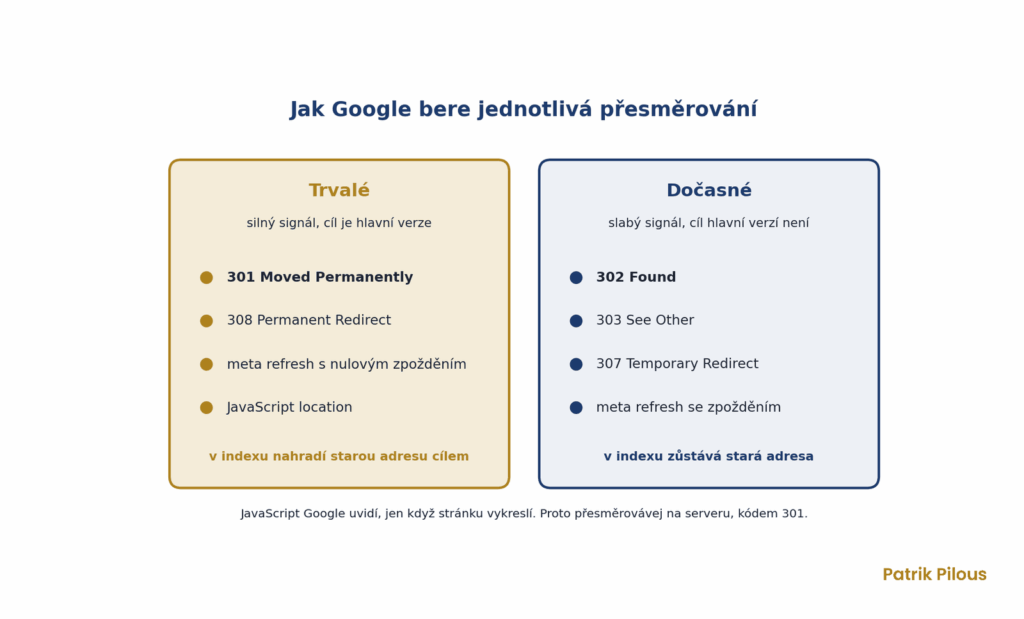
A temporary redirect does not mean your links go to waste. However, Google does not treat the destination as the main version and may keep showing the old address in the results. Anyone who uses a 302 for a permanent move often spends weeks watching Google show an address that no longer exists.
Redirect chains and loops
A chain occurs when address A leads to B, which leads to C. This typically happens after several redesigns when nobody updated the older rules, or when a move to https, adding www, a trailing slash and converting the address to lowercase all pile up together. Google will follow up to ten redirects in a row, then give up. Each step, however, slows down both the crawler and the visitor, and needlessly risks one link in the chain breaking over time.
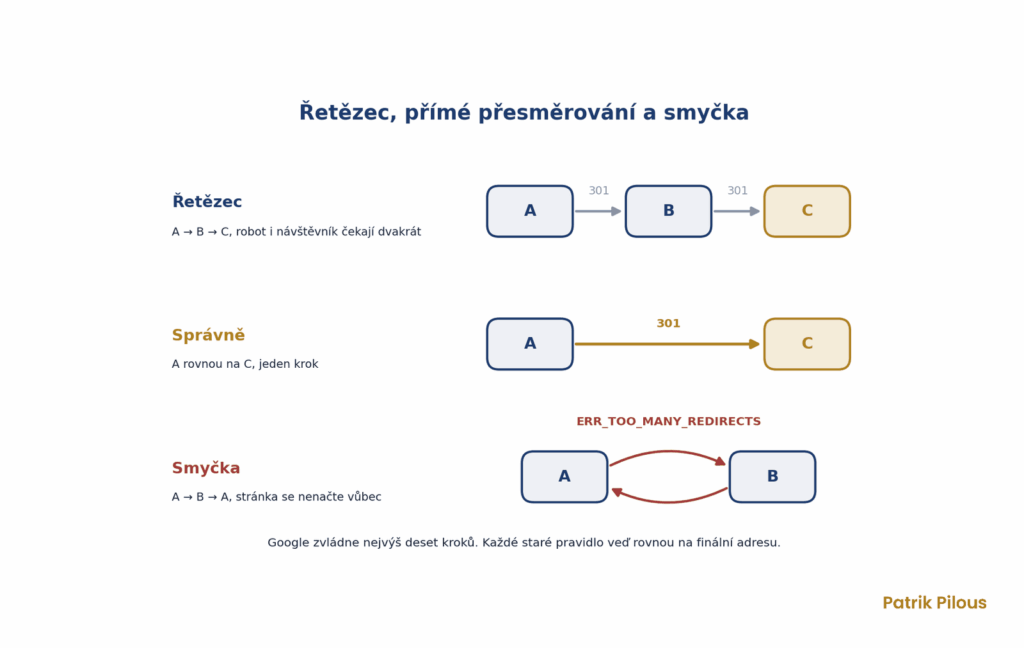
A loop is the worse version, where address B leads back to A. After a few attempts, the browser ends with an ERR_TOO_MANY_REDIRECTS error and the page is inaccessible to everyone. I fix both in the same way. I rewrite every old rule so that it leads straight to the final address, and I fix internal links so that they do not point to redirects at all.
Redirects during a website migration and URL change
A migration is when redirects are set up on a large scale and when things most often go wrong. The foundation is a redirect map, a table that pairs each old address with exactly one new one. Google recommends it directly in its site move guide, and I want to see it before the new version goes live.
I never compile the list of old addresses from a single source, because each one misses something. I combine the sitemap, a crawl of the old version, pages with traffic from Google Search Console and Analytics, and pages with backlinks from Ahrefs. Only by combining them can I see which URLs really existed and which ones someone links to.
- Collect all old addresses from the sitemap, crawl, Search Console, Analytics and Ahrefs.
- Match each one to the closest new page with the same content or intent, not the homepage.
- Deploy the rules on the server as 301s and test them against the full list while still on the staging version.
- After launch, update internal links, canonical tags, hreflang and the sitemap so they point to the new addresses.
- For weeks after launch, monitor 404 errors and the Indexing report in Google Search Console.
According to Google, keep redirects in place for as long as possible, generally at least a year. I never remove them as long as links point to the old addresses. For a medium-sized website, it takes several weeks for Google to replace the old addresses with the new ones in the results, and longer for a large one. When moving to a different domain, also use the Change of Address tool in Search Console. It is not needed for a move to https or a www change.
Why 301 redirects matter
Migrating a website without correctly set up 301s is the fastest way to lose traffic. Every removed URL that has external or internal links pointing to it must have a destination, otherwise visitors and crawlers hit a 404 error and the link strength is lost. A forgotten redirect only shows up as a drop in the data, often with a delay of several weeks.
Redirects also hold your site structure together as it changes. Categories get merged, products disappear, brands are renamed and articles are rewritten. That is why checking redirects is a key part of every SEO audit, even when no migration is planned.
How I check redirects
The quickest way to check a single address is the server response header. The browser hides the redirect because it takes you straight to the destination, so you only see the status code in the developer tools or a browser extension. I always check without following redirects, otherwise you only see the 200 code from the destination page and the problem disappears.
For the whole website I use two tools and supplement them with Search Console. Each one sees something different, which is why I combine them.
- Screaming Frog. In List mode I upload a list of old addresses, enable the Always Follow Redirects option, and in the Redirect Chains report I see the status code, number of hops, destination and any loop for each URL.
- Ahrefs Site Audit. During regular crawls it reports redirect chains and loops. It also shows internal links that needlessly point to redirected pages.
- Ahrefs Site Explorer. It shows pages with backlinks that now return a 404, which are exactly the ones that need redirects most.
- Google Search Console. In URL Inspection I check which address Google has chosen as canonical, and in Indexing I monitor redirect errors.
Common mistakes on WordPress and Shoptet
On WordPress, 301s are most often handled through a plugin or directly in the server configuration, which on Apache means the .htaccess file. When you change the slug of an already published post, WordPress remembers the old slug and automatically redirects the old address with a 301. Problems arise when a plugin rule is added on top and creates a chain, or when the plugin’s redirect table is lost during a migration between domains.
Shoptet has its own trap, and I keep running into it on my clients’ e-shops. When you hide or delete a product, Shoptet automatically creates a 301 to its category so the address does not return a 404. But when the product later goes back on sale, the redirect stays in place and keeps overriding it. The product exists and is in stock, but nobody can reach it.
You remove these redirects in the administration under Marketing, Basic SEO (Základní SEO), URL redirects (Přesměrování adres). Renaming products, on the other hand, only creates a 301 if automatic redirect on product change is switched on in the Advanced SEO (Pokročilé SEO) add-on. Without it, you get 404s. On Shopify I came across a different rule: a redirect set up in the admin only applies to an address that returns a 404, so you first have to remove the existing page.
Where it goes further
A redirect is really the digital equivalent of the post office forwarding your letters to your new address when you move. And just as in everyday life, if you change your address quietly and tell no one, some of your post gets lost. A website is never finished: content gets moved, merged, rewritten and deleted.
A 301 redirect is the tool that holds together what you have built, even when the foundations underneath are changing. It is a silent guardian of value that people forget about until one day traffic drops without warning.
The most common mistakes
I find these mistakes in audits again and again, on small websites and on e-shops with thousands of products alike. None of them is hard to fix; it is just that nobody knows about them.
- Removing an old page without a redirect, so both the visitor and the link equity end up on a 404 error instead of relevant content.
- Using a temporary 302 where the change is permanent, so Google may keep showing the old address instead of the new one.
- Chaining redirects one after another, where one address leads to a second and that to a third, which slows down both the crawler and the user.
- Redirecting all old URLs in bulk to the homepage instead of to the matching new page. Google may treat this as a soft 404.
- Internal links and the sitemap still pointing to old, redirected addresses after a migration.
If you are not sure whether any of these applies to you, a single crawl with Screaming Frog and an export of pages with 404 and 3xx codes is enough. You will quickly see how many redirects are missing and how many take a detour, and then you can fix them using the map from the chapter on migration.
Questions about 301 redirects
Short answers to the questions people ask most often about redirects, whether they call it a 301 redirect, a redirect or a 301 code.
What is a 301 redirect?
A permanent redirect from one URL to another using the HTTP 301 status code. It tells the search engine that the page has moved permanently and passes the old address’s signals, mainly links, to the new one.
What is the difference between a 301 and a 302?
A 301 is permanent, and Google replaces the old address with the new one in its index. A 302 is temporary; it is used when the page will return to its original URL after a while, and Google usually keeps the old address in the results. Choosing the wrong one is a typical audit finding.
Does a 301 redirect pass on SEO value?
Yes. According to Google, redirects no longer cost you PageRank when you move content, which is why a 301 is the safe choice for a website migration. Bear in mind, though, that Google needs several weeks before it shows the new addresses in the results instead of the old ones.
How long should a 301 redirect stay active?
Google recommends as long as possible, generally at least a year. As long as backlinks point to the old address, do not remove the redirect at all.
Is a 301 or a 308 better?
For SEO it makes no difference; Google treats both codes the same, as a permanent redirect. The only difference is that a 308 preserves the request method, which matters for forms and APIs.

