SEO directly on the page
On-page SEO
On-page SEO is everything you change directly on a page so that it matches what people are searching for and so that search engines and AI can understand it. That means the content and how well it matches search intent, the title, headings, URL, images, internal links and structured data. Unlike links from other websites, all of this is in your hands.
I do on-page work for clients as a standalone project and as part of an audit or ongoing SEO management. You get a list of changes for each page with ready-to-use copy, plus before and after measurements. On this page I describe how I work, which elements carry the most weight, which myths I don’t believe and how I use the data to decide what to fix on a page first.
What I cover in on-page SEO

Search intent
Whether the page gives people what they were searching for. Without that, other changes won't help.

Content and structure
The answer right at the start, headings that carry information and passages that still make sense when taken out of context.

Title and description
A title that tells both Google and people what the page is about, and a description that makes people click.

Internal links
Links between pages on your website with descriptive anchor text. Work you don't pay anyone for and have full control over.

Images and media
Compressed images with descriptive alt text and file names that don't slow down loading.

Structured data
Schema.org markup that tells a search engine whether the page is a product, an article, a business or a recipe.
Who have I provided web and SEO consulting for?
VYNIKAJÍCÍ Na základě 42 hodnocení Zveřejněno na Google Pavel Vondruška01/09/2026 Spolupracujeme v oblasti linkbuildingu a obsahových spoluprací. Komunikace je vždy rychlá, férová a profesionální, spolupráci mohu doporučit.Zveřejněno na Google Denisa Palková26/08/2026 S Patrikem spolupracuju na marketingu Chlorita, který celý vede. Já s kolegyní máme na starosti hlavně obsah, produkci a sociální sítě. Oceňuju, že naslouchá našim nápadům a normálně s námi diskutuje o tom, co a jak by mohlo fungovat. Zároveň je ale pořád cítit, že má celý marketing pod kontrolou. Umí se rozhodnout, věci pushnout, dotáhnout a má přehled o tom, co se zrovna řeší. Komunikace s ním je rychlá, věcná a funguje bez zbytečných komplikací.Zveřejněno na Google Marek Jelok24/08/2026 Ďakujem za výbornú dlhodobú spoluprácu v linkbuildingu. S Patrikom sa vždy vieme dohodnúť k obojstrannej spokojnosti pri získavaní spätných odkazov pre klientov.Zveřejněno na Google Martina Králová13/07/2026 Spolupráce s IdeUp a Patrikem Pilousem proběhla bez problémů, komunikace byla rychlá a věcná a celý proces publikace čtyř článků na portálu Videobydlení.cz byl dobře zorganizovaný. Spolupráci doporučujeme. Tým B3 TechnologyZveřejněno na Google Petr Kutka06/07/2026 Příjemná spolupráce a odbornost. Děkuji.Zveřejněno na Google Bartosz O23/06/2026 Profesionální přístup, skvělý servis – firmu mohu jednoznačně doporučit.Zveřejněno na Google Martin Kolčák01/06/2026 Ďakujem za skvelú rýchlu a profesionálnu prácu v oblasti linkbuildingu pre klienta!Zveřejněno na Google Anna Mejsnarová18/05/2026 Mimo dobrých jednohubek Patrik zvládá i různá zákoutí online marketingu. Sama jsem ho doporučila několika klientům, což mluví samo za sebe.Zveřejněno na Google Markéta Kadeřábková13/04/2026 S Patrikem spolupracuji už několik let v oblasti SEO, copywritingu a linkbuildingu. Oceňuji jeho proaktivitu, zápal pro učení se nových věcí a ochotu ve všem vyhovět. Spolupráci s ním vřele doporučuji.Zveřejněno na Google Jan Janda25/03/2026
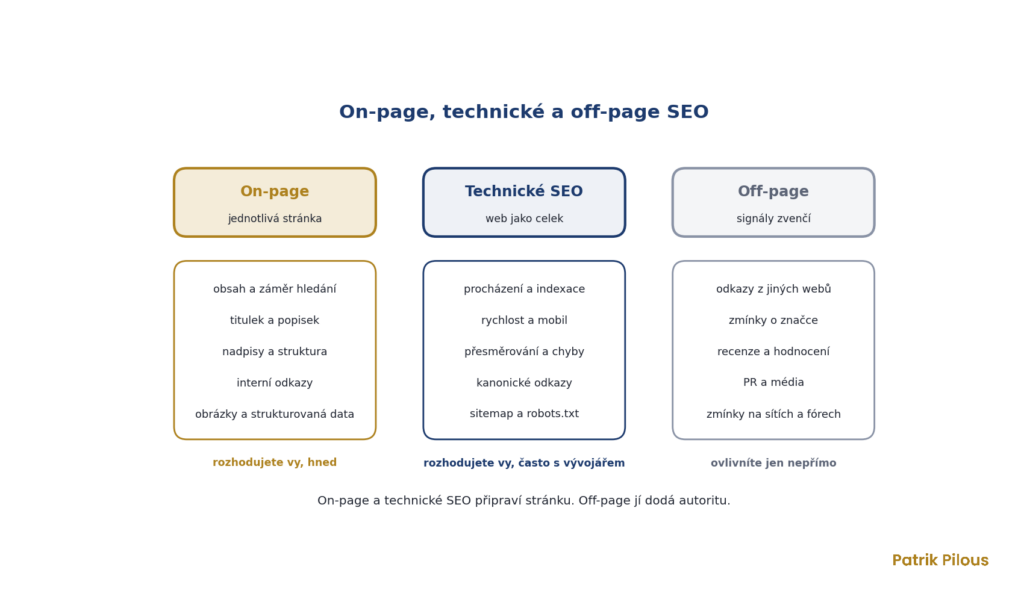
On-page, off-page and technical SEO
SEO is usually divided into three areas depending on where the work happens. On-page covers an individual page and its content. Off-page covers external signals, mainly links from other websites, brand mentions and reviews. Technical SEO deals with the website as a whole, meaning whether bots can crawl and index it and whether it loads quickly.
The boundaries aren’t sharp. Page speed is a technical matter, but you can damage it with an uncompressed image during a routine content update. A canonical link is a technical element, but it decides which of two similar pages will rank. That’s why I never do on-page work separately from technical SEO, I just start with a different question.
Why I start with on-page
Links are expensive and slow. And even if links push a page higher, a visitor who doesn’t find what they were looking for won’t buy anything or send an enquiry. That’s why I sort out the pages first and only then work out how many links are needed and where they should point.
In my experience, the bar is low in many Czech industries. Often a page that genuinely answers the query and has a sensible structure is enough to overtake competitors, even without new backlinks. In industries where authority has been built with links for years, such as finance or insurance, that’s not enough. But even there, a link to a weak page is money thrown away.
What my on-page audit looks like
I don’t go through a page against a checklist of factors. I start by asking whether the page actually matches what people want for a given query. Only then do I look at titles and headings. The process has five steps.
- Query intent. I look at the search results to see which pages Google shows for the query. When e-commerce category pages rank, an article won’t succeed, and vice versa. More on this in the glossary entry search intent.
- Search Console data. Which queries the page already appears for, in what position and with what click-through rate. This is the cheapest source of ideas for what to add.
- Comparison with the top results. What the pages in the top positions have that we don’t. It’s not about copying, but about finding out which questions readers expect answered.
- Page elements. Title, description, headings, copy, images, structured data. I extract them in bulk for the whole website from Screaming Frog.
- Internal linking and measurement. Which pages link to the URL and with what anchor text. And how I’ll measure after the change whether it helped.
I always use the same tools. Search Console, Screaming Frog, Ahrefs and Marketing Miner for competitor and search volume data, and PageSpeed Insights for speed. But none of them decides what is wrong with a page.
Page elements I check
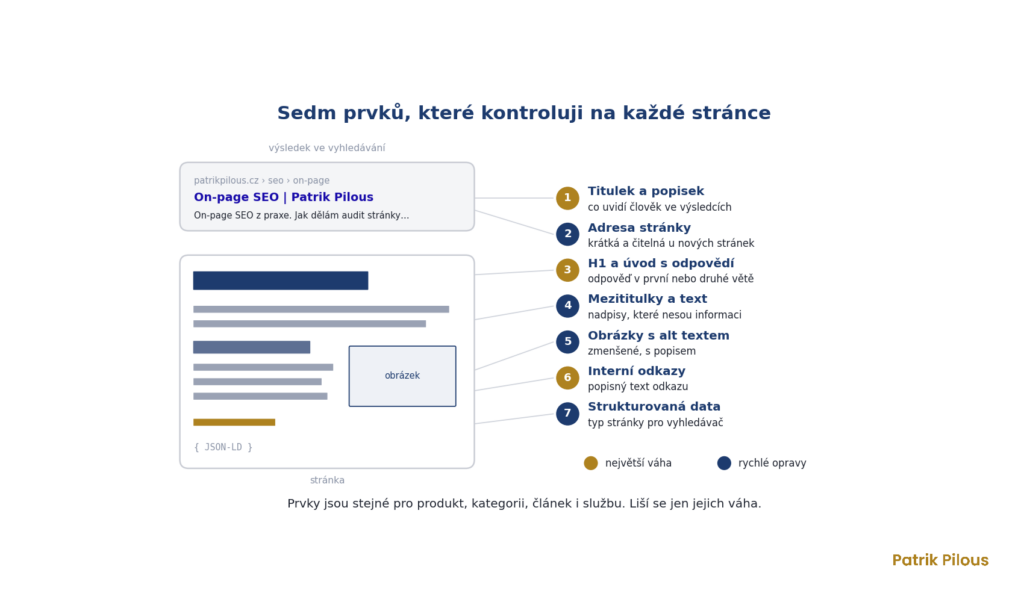
On every important page I go through seven elements: the title and description, the URL, the H1 with the introduction, subheadings and copy, images, internal links and structured data. They don’t differ depending on whether it’s a product, a category, an article or a service page, only in how much weight they carry.
Content and how well it matches intent carry the most weight. Right behind them come the title and internal links. Alt text and structured data are decisive less often, but they tend to be the quickest fixes, so I do them in the same step as everything else.
Content that matches intent
The copy should answer what the person came for in the first or second sentence. Readers skip an introduction about how important the topic is, and AI won’t find an answer in it either. Each section has a heading that carries information, followed by an answer that can be taken out and still make sense.
In its beginner’s guide, Google says there is no ideal word count, neither minimum nor maximum. So I don’t set the length based on competitors, but on how many questions the page has to answer. For an e-commerce category that’s usually a few paragraphs, for a service page or a guide much more.
On-page by page type
The same list of elements looks different on each page type. Most mistakes happen when the approach for a blog article is applied to an e-commerce category, or vice versa.
- E-commerce category. Products go at the top, the copy is shorter and answers questions people have while choosing. The title contains the category name as people search for it.
- Product. Your own description instead of the manufacturer’s text that dozens of other online shops also use. Plus specifications, photos with alt text and Product structured data.
- Article. The answer in the first paragraph, a named author, an update date and sources for figures.
- Service page. What exactly you deliver, for whom, how the collaboration works and what the price depends on. People come here looking for a reason to get in touch, not a definition.
On Shoptet online shops, parametric pages and filters add to this, and on WordPress, themes can break titles and headings in bulk. That’s why the page type is always the first thing I ask about.
Title and meta description
The title is the quickest way for both Google and people to tell what a page is about. But Google doesn’t have to use the one you write. It can build the link text in the results from the H1 heading, from link text on the page or from links pointing to the page. Google doesn’t limit title length, it just truncates it in the results based on screen width. That’s why I put the main query at the start and every page has a title different from the others. More in the glossary entry title tag.
The meta description doesn’t affect rankings, but it can influence clicks when Google uses it in the results. Google builds the snippet mainly from the page content and uses the description when it describes the page more accurately. A good description promises exactly what the page delivers and nothing more. Details are in the glossary entry meta description.
Headings, URL and images
There should be one H1 heading, and it should match the title. H2 and H3 subheadings divide the copy according to what the reader is asking. According to its guide, Google doesn’t penalise pages with headings out of order and doesn’t state an ideal number of headings. I still keep a logical hierarchy because it helps readers using screen readers and models that select passages from the text.
According to Google, a keyword in the URL has almost no effect, except that the URL may appear as a breadcrumb. I create short, readable URLs for new pages. I don’t change the URLs of existing pages for SEO, as the risk associated with redirects is usually greater than the gain. I give images short alt text describing what the image shows and why it’s there, and I resize them before uploading.
Internal links, the most underrated part of on-page
In my view, internal links are the most overlooked part of on-page. They cost nothing, you have full control over them and they determine which pages the website treats as important. A link with descriptive anchor text tells Google more about the target page than a “more here” link.
During an audit I look for pages that no links point to, important pages buried deep in the structure and two pages on the same topic that take positions from each other. I solve the last case by merging them, differentiating the content or using a canonical link, depending on what makes sense. More in the glossary entry duplicate content.
Structured data and page speed
Structured data helps a search engine understand what is on a page, and for products, recipes or articles it can add ratings, prices or images in the results. But it doesn’t entitle you to a rich result. And types that Google stops displaying become pointless overnight. From 2023, Google showed FAQ rich results (expandable questions directly in the results) only for authoritative government and health websites, and since 7 May 2026 it doesn’t show them at all.
I measure speed in PageSpeed Insights using Core Web Vitals. Good values are rendering the largest element within 2.5 seconds, responding to an interaction within 200 milliseconds and a layout shift of up to 0.1, assessed at the 75th percentile of visits. I don’t chase a score of 100, I fix the things that genuinely slow loading down. More in the glossary entry Core Web Vitals.
The most common issues an on-page audit finds
Myths are one thing, real mistakes are another. The same ones keep appearing on the websites I get my hands on, and most of them did not come from bad intent but from a template or a rush at launch.
- The same title on dozens of pages, because the template generates it.
- A missing H1, or two or more, usually the logo or site name marked up as a heading.
- E-shop categories with no text, or with text copied from the manufacturer.
- Important pages with no links from the content, only from the menu or the sitemap.
- Images uploaded at full camera size that slow down the whole page.
None of these mistakes will sink a website on its own. Together, though, they make the difference between a page that ranks for a query and a page that only appears on the second page of results.
Five myths I throw out of on-page SEO
Some on-page SEO advice has been circulating online for years, even though Google itself refutes it. These five are the ones I see most often in audits by other providers.
- Meta keywords. According to its own documentation, Google does not use this tag at all. Filling it in is a waste of time.
- An ideal word count. There is no such thing. Length is a result of how many questions the page answers.
- E-E-A-T as a ranking factor. When asked whether E-E-A-T is a ranking factor, Google says it is not. It is a framework Google uses to describe quality content, see the entry E-E-A-T.
- Keyword density. Google classes repeating the same phrase over and over as a spam practice. Text should contain the words people use when they talk about the topic, not one word 25 times.
- Structured data as a guarantee. Markup does not guarantee anything in the results, as the end of FAQ results showed.
They have one thing in common. They promise a quick result for a mechanical tweak and distract from what really matters, which is whether the page answers better than the competition.
What to fix based on Search Console data
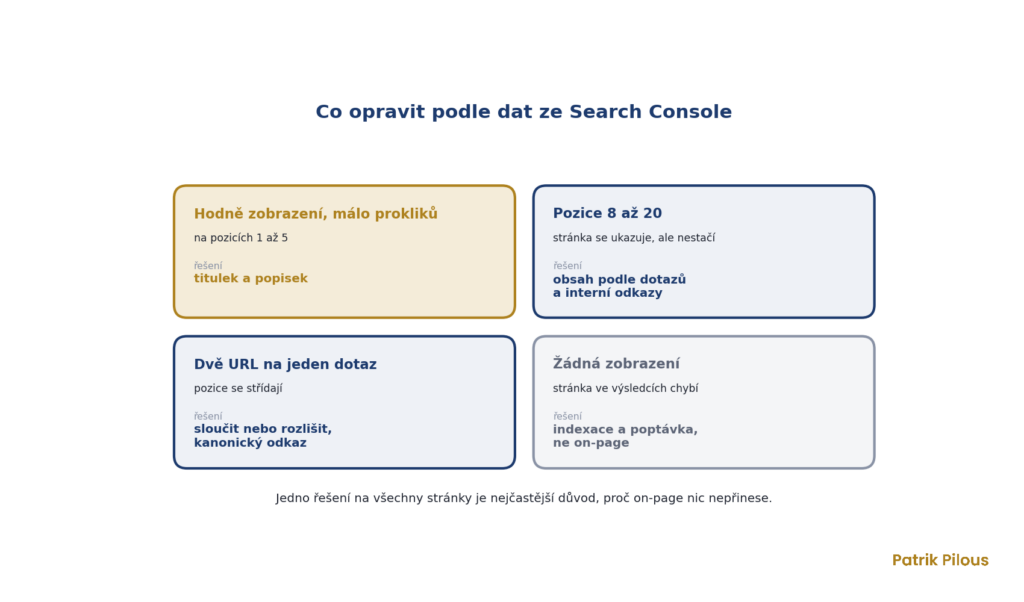
Search Console tells me where on-page changes have the best chance of working. I look for four situations, and each one needs a different solution. Applying the same solution to every page is the most common reason on-page work brings nothing.
A page with a high number of impressions and a low click-through rate in top positions usually needs a better title and description. First, though, I check the results to see whether the clicks are being taken by ads, an AI Overview or Google’s own answer, because a title will not fix that.
A page in positions 8 to 20 usually needs more content based on the queries it already appears for, and more internal links. When two URLs alternate for one query, it may be cannibalisation, a situation where two pages on the same website compete with each other and neither settles at the top. If they serve the same intent, I merge them; if the intent differs, I differentiate the content.
A page with no impressions usually does not have an on-page problem, but an indexing problem, or nobody searches for the query. There I start with technical SEO and demand analysis, not with the title.
On-page SEO and AI search
For AI Overviews and AI Mode, Google states a simple rule. No special requirements or special structured data are needed. The page must be indexed and eligible to be shown with a snippet, meaning it must meet the same basics as for regular results. According to Google, an llms.txt file is not needed for its search either, and it will neither improve nor harm visibility.
In practice, this means good on-page SEO is also a good foundation for AI. Important content should be in the text, not just in an image or a script. Answers should sit right below the heading. And each section should make sense on its own, because AI does not take the whole page but individual passages.
How I do on-page SEO for clients
I start with the pages that have the greatest potential according to Search Console and their business value, not in alphabetical order. The output is a list of changes for each URL with a priority and ready-made titles, descriptions and added passages. On WordPress or Shoptet I often deploy the changes myself; elsewhere I hand them over to developers.
After deployment, I compare impressions, clicks and positions of the updated pages with their state before the changes. If you want to know where your on-page SEO has the most room for improvement, start with an SEO audit. It will show the pages where changes pay off most, as well as the technical errors that would hold them back. If you already know which pages you want to improve, write to me directly using the form at the bottom of the page.
What is on-page SEO?
On-page SEO covers changes made directly on a page that affect how a search engine understands it and how it displays it. This includes the content and how well it matches search intent, the title, description, headings, URL, images, internal links and structured data.
What they have in common is that they are fully under your control.
What is the difference between on-page and off-page SEO?
On-page concerns your page and its content. Off-page refers to external signals, mainly links from other websites, brand mentions and reviews.
You can change on-page yourself and straight away. You influence off-page indirectly, and it takes longer.
Which on-page factors matter most?
Content that matches search intent. Then the title and internal links, which determine how Google understands the page and how important it is within the website.
Meta keywords, word count and keyword density are not among them.
How long does it take for on-page changes to show?
Google first has to crawl the page again. A title change usually appears in the results within a few days to weeks; movement in positions after content changes takes longer.
That is why I measure the result only after several weeks and compare periods of equal length.
Is on-page SEO enough without links?
In some Czech industries, yes. The quality of competitors’ pages is low there, and a good page will overtake weaker ones even without new links. In industries with long-established authority, such as finance or insurance, it is not enough.
You can tell how many links you need from how many the pages in the top positions have, and a competitor analysis in Ahrefs will show you.
What is on-page SEO
On-page SEO is optimisation directly on the page. It includes the content and how well it matches search intent, the title and description, headings, page URL, images, internal links and structured data. Unlike off-page SEO, meaning external links and mentions, it is fully under your control.
Get in touch