Tools I use
SEO tools
Over the years I have tried dozens of SEO tools and dropped most of them. This is the set I use every day for clients, from large brands to Shoptet e-shops. For each tool I explain what I actually use it for, what it costs and when the free version is enough.
One thing up front: no tool will do SEO for you. Tools give you data, but deciding what that data means is still human work. That is why paying for five tools makes no sense. Two or three that you really master do. For most websites, Search Console, Google Analytics 4 and one paid tool are enough.
My SEO toolkit

Ahrefs
Keywords, competitors, links and technical audits. The one tool I would keep if I had to cancel all the others.

Marketing Miner
The best data for the Czech market, search volumes from Seznam (Czech search engine) and bulk analysis of hundreds of URLs and keywords.

Google Search Console
The only source of real data from Google. Queries, clicks, positions and indexing. Free for every website.

Screaming Frog
An X-ray of your website. It crawls every page the way Google does and shows errors, redirects, duplicates and weak internal linking.

Google Analytics 4
What happens after the click. Where people came from, what they do on the site and whether they bought something or sent an enquiry.

Claude, ChatGPT and Gemini
Data processing, keyword sorting, a second opinion on copy and routine work that used to take hours in Excel.
Who have I provided web and SEO consulting for?
VYNIKAJÍCÍ Na základě 42 hodnocení Zveřejněno na Google Pavel Vondruška01/09/2026 Spolupracujeme v oblasti linkbuildingu a obsahových spoluprací. Komunikace je vždy rychlá, férová a profesionální, spolupráci mohu doporučit.Zveřejněno na Google Denisa Palková26/08/2026 S Patrikem spolupracuju na marketingu Chlorita, který celý vede. Já s kolegyní máme na starosti hlavně obsah, produkci a sociální sítě. Oceňuju, že naslouchá našim nápadům a normálně s námi diskutuje o tom, co a jak by mohlo fungovat. Zároveň je ale pořád cítit, že má celý marketing pod kontrolou. Umí se rozhodnout, věci pushnout, dotáhnout a má přehled o tom, co se zrovna řeší. Komunikace s ním je rychlá, věcná a funguje bez zbytečných komplikací.Zveřejněno na Google Marek Jelok24/08/2026 Ďakujem za výbornú dlhodobú spoluprácu v linkbuildingu. S Patrikom sa vždy vieme dohodnúť k obojstrannej spokojnosti pri získavaní spätných odkazov pre klientov.Zveřejněno na Google Martina Králová13/07/2026 Spolupráce s IdeUp a Patrikem Pilousem proběhla bez problémů, komunikace byla rychlá a věcná a celý proces publikace čtyř článků na portálu Videobydlení.cz byl dobře zorganizovaný. Spolupráci doporučujeme. Tým B3 TechnologyZveřejněno na Google Petr Kutka06/07/2026 Příjemná spolupráce a odbornost. Děkuji.Zveřejněno na Google Bartosz O23/06/2026 Profesionální přístup, skvělý servis – firmu mohu jednoznačně doporučit.Zveřejněno na Google Martin Kolčák01/06/2026 Ďakujem za skvelú rýchlu a profesionálnu prácu v oblasti linkbuildingu pre klienta!Zveřejněno na Google Anna Mejsnarová18/05/2026 Mimo dobrých jednohubek Patrik zvládá i různá zákoutí online marketingu. Sama jsem ho doporučila několika klientům, což mluví samo za sebe.Zveřejněno na Google Markéta Kadeřábková13/04/2026 S Patrikem spolupracuji už několik let v oblasti SEO, copywritingu a linkbuildingu. Oceňuji jeho proaktivitu, zápal pro učení se nových věcí a ochotu ve všem vyhovět. Spolupráci s ním vřele doporučuji.Zveřejněno na Google Jan Janda25/03/2026
How I combine the tools
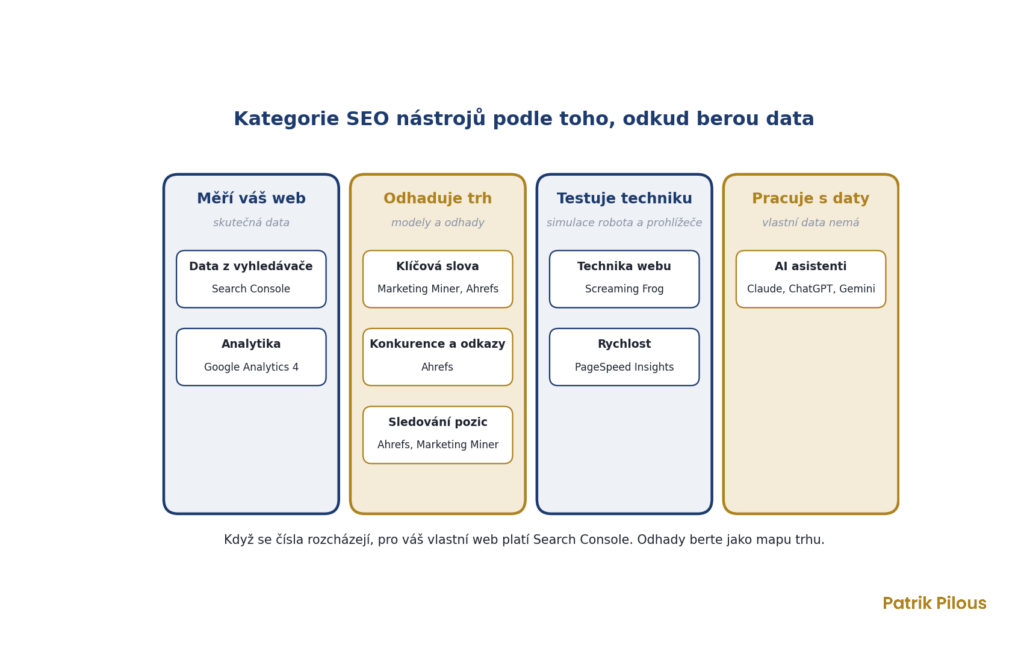
Each tool answers a different question. Search Console and analytics show what is really happening on your website. Ahrefs and Marketing Miner show the market and the competition. Screaming Frog and PageSpeed Insights keep an eye on the technical side, and AI tools speed up working with data.
Only together do they give a usable picture. When traffic drops, Search Console shows which queries and pages are affected. Ahrefs reveals whether a competitor has overtaken you, and Screaming Frog uncovers whether something on the site has broken.
Ahrefs, the tool most of my work is built on
I use Ahrefs every day. I start analysing a new website in it, looking at which keywords competitors rely on, which pages bring them traffic and where their links come from. For link building it is my main tool. Domain Rating is commonly used as a rough measure of a website’s strength when choosing links, although on its own it does not determine link quality.
Its weak spot is small Czech queries, whose search volume Ahrefs often underestimates. That is why I combine it with Marketing Miner. The Starter plan starts at $29 a month, the full Lite plan costs $129 and Standard $249 a month, with a small discount for annual billing.
For your own website, the free Ahrefs Webmaster Tools is worth using. Once you verify your site, you get a technical audit with 5,000 crawl credits per project per month and an overview of your own site’s links and keywords. You cannot look at competitors, though.
Marketing Miner, the best data for the Czech Republic
Marketing Miner is a Czech tool with a big advantage for the Czech market: its search volumes also draw on data from Sklik, the Seznam advertising system, so they reflect demand on Seznam too. I check search volumes here every time I do keyword research for a Czech or Slovak client.
Its second strength is bulk analysis. You upload hundreds of URLs or keywords and Miner adds search volume, positions, indexing or status codes. It tracks positions for a client and its competitors in a single SERP at once, on both Google and Seznam. That saves hours of manual work.
It is much more affordable than international tools. The Starter plan costs €20 a month excluding VAT, Miner €35 and Digger €75. You can try it free for 10 days. A newer feature is measuring visibility in ChatGPT and Gemini answers, which is paid for with separate AI credits.
Search Console, the only source of truth
Paid tools estimate the search volume, positions and traffic of other websites. Google Search Console shows data straight from Google: which queries the site appeared for, how many people clicked, at what average position and why Google did not index certain pages.
What I look for most are queries in positions 5 to 15 with a high number of impressions. That is where even a small change, a better title or a few internal links, often has a noticeable effect. I explain how to use it to deal with indexing separately.
There are two limits clients run into. Search Console keeps data for only 16 months, and you can export at most 1,000 rows from the interface. For clients I therefore pull the data through the API and store it in my own archive, otherwise year-on-year comparisons would be lost after a year and a quarter. The new generative AI report shows impressions in AI Overviews and AI Mode, but without clicks or queries.
Screaming Frog, an X-ray of your website
Screaming Frog crawls a website much like a search engine bot and lists what it finds: titles, descriptions, headings, status codes, redirects, canonical links and internal linking. I cannot imagine technical SEO or any migration without it.
Before changing a site’s structure, I download a list of all URLs, and afterwards I check that the old addresses redirect correctly. On one e-shop, this is how we found and redirected hundreds of broken addresses at once after a structure change. Screaming Frog is free for up to 500 URLs, and an annual licence costs £199.
Analytics and site speed
Search Console stops the moment someone clicks. Google Analytics 4 shows what they do next and whether they made a purchase or sent an enquiry. This matters to me, because clients are not interested in traffic but in orders and enquiries from search.
I check speed and Core Web Vitals in PageSpeed Insights. It shows two different sets of numbers: a lab test from Lighthouse and data from real Chrome visitors, if the site has enough of them. The second one is what counts. I do not chase a score of 100. I fix the things that really slow loading down, such as large images, slow hosting or unnecessary third-party scripts.
AI tools in SEO work
Claude, ChatGPT and Gemini are now part of my everyday toolkit. I use them to group keywords into clusters, process exports from Search Console and Screaming Frog, and prepare briefs for copy. I use Gemini as a strict reviewer whose job is to find mistakes in a text before the client sees it.
The biggest step forward came when I connected AI directly to my tools. Both Ahrefs and Marketing Miner offer MCP integration, so Claude pulls data on positions, links and search volume by itself and I can ask straight for conclusions. Routine work that used to take hours now takes minutes. But I do the checking and the decision-making myself, because AI makes mistakes just as confidently as a junior.
AI is also a new search channel. Some people now ask ChatGPT or Perplexity instead of Google, or alongside it. I explain how to get into their answers on the GEO page.
Categories of SEO tools
Tools differ mainly in where they get their data. Search Console and analytics measure your own website and estimate nothing. Ahrefs, Marketing Miner and Semrush estimate the whole market, including competitors. Crawlers and speed tests check the technical side, and AI works with data but has none of its own.
- Search engine data shows how Google sees your website. I use Search Console, and Bing Webmaster Tools is an alternative.
- Keyword tools tell you what people search for and how often. I use Marketing Miner and Ahrefs, and Keyword Planner and Sklik are free.
- Competitor and link tools show who is doing well and why. Ahrefs is enough for me here, and Semrush does something similar.
- Rank tracking monitors where a site ranks and how that changes. I track in Ahrefs and Marketing Miner, and Collabim is popular in the Czech Republic.
- Technical tools reveal what is broken on a website. I use Screaming Frog, and Sitebulb is an alternative.
- Speed tools measure how fast a page loads and responds. PageSpeed Insights and Lighthouse in Chrome are enough.
- Analytics shows what people do after the click. I use Google Analytics 4, which you can complement with Microsoft Clarity.
This leads to a simple rule. When two tools disagree, Search Console is right about your own website. Treat estimates from paid tools as a map of the market and a comparison with competitors, not as exact figures.
Browser extensions
The extension I use most is Claude in Chrome. It clicks through interfaces for me where there is no API, for example when requesting indexing in Search Console or downloading reports. It saves a lot of repetitive clicking, but it only works on paid Claude plans.
For a quick page check without running a crawler, a few free add-ons come in handy. Treat these four as tips worth trying, not as my everyday toolkit.
- Ahrefs SEO Toolbar shows the title, description, headings, broken links and the full redirect chain.
- Redirect Path by Ayima tracks status codes and redirects as you browse a website.
- Detailed SEO Extension summarises a page’s on-page elements and indexability in one click.
- Chrome DevTools have Lighthouse built in, so you do not need a speed extension.
Free SEO tools
You do not need to pay for anything to get started. Free tools cover most of the basic work on your own website. What they mainly lack is a view of competitors and the market, and you cannot get that without a paid tool.
- Google Search Console for queries, clicks, positions and indexing.
- Google Analytics 4 for user behaviour and conversions.
- Ahrefs Webmaster Tools for audits and links of your own verified website.
- Screaming Frog, free version up to 500 URLs.
- PageSpeed Insights for speed and Core Web Vitals.
- Google Trends for seasonality and comparing interest in topics.
- Keyword Planner in Google Ads and keyword suggestions in Sklik for search volumes.
Once you are serious about SEO, add a paid Marketing Miner plan and a Screaming Frog licence. In a competitive industry, for link building or with a large website, Ahrefs is worth it. This is the set I work with.
How to choose tools
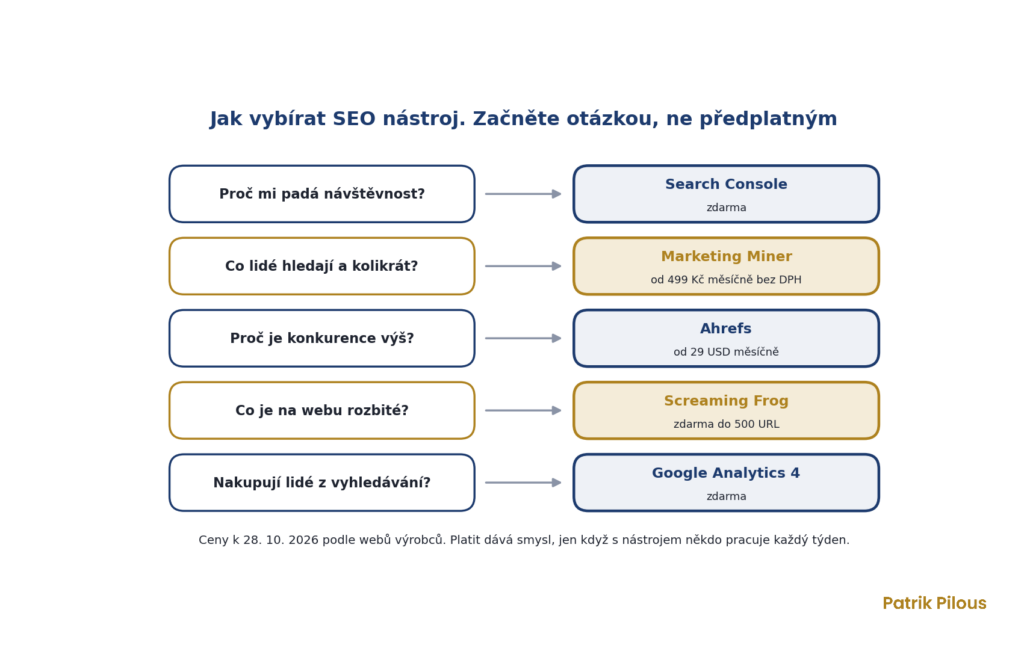
Do not start with a tool, start with a question. If you want to know why your traffic is dropping, you need Search Console, not an annual subscription. If you are planning a new e-shop structure, you cannot do anything sensible without search volumes from Marketing Miner or Ahrefs.
Before every subscription, I ask myself five questions, and if I answer no to two of them, I do not buy.
- What question will the tool answer for me, and can something I already have do that?
- Does it have data for the Czech market and for Seznam, or only for Google worldwide?
- Will someone work with it at least once a week?
- Can I get the data out through an export or API so I can combine it with other data?
- How much does it cost per year, including extra users and credits?
For a typical Czech website or e-shop, I recommend this set. Search Console and Google Analytics 4 for free, Marketing Miner for search volumes and rankings, Screaming Frog for technical issues. Add Ahrefs once you are dealing with competitors and backlinks at scale.
The most expensive mistake I see at companies is not a bad tool. It is a good tool that someone pays for and nobody has looked at for a year. If you are not sure which of these you need, we can go through it together in a consultation. And if you do not want to operate the tools at all, I can run them for you as part of ongoing SEO management.
Which SEO tools are free?
Google Search Console, Google Analytics 4, Ahrefs Webmaster Tools, PageSpeed Insights, Google Trends and Screaming Frog up to 500 URLs cover the basics.
For a small website, that is enough to start with. What is mainly missing is data on competitors and other websites.
What is the best Czech SEO tool?
Marketing Miner, mainly because of its data from Seznam and Sklik and its bulk analyses. For rank tracking alone, Collabim is often used in the Czech Republic.
I track rankings in Ahrefs and Marketing Miner because I use them for other things too and do not want to pay for a third tool.
How much do SEO tools cost?
Marketing Miner starts at €20 a month excluding VAT, and a Screaming Frog licence costs £199 a year. Ahrefs starts at $29 for Starter, with the full Lite plan at $129 a month.
But most websites do not need everything. One or two tools that someone actually uses are enough.
How long does Search Console keep data?
Sixteen months. Google deletes older data, which is why I regularly download it via the API into my own archive for clients.
Without an archive, after a year and a quarter you lose the year-on-year comparison, which is the most valuable thing in seasonal industries.
Will a tool do SEO for me?
No. A tool shows data and errors, but priorities, strategy and implementation are human work. The most expensive mistake is paying for tools that nobody can read anything from.
If you are not sure what to do with your data, write to me via the form at the bottom of the page. We will go through what makes the most sense for you.
Why do you use Ahrefs and not Semrush?
Both tools can do similar things. Ahrefs suits me better for backlinks and competitor analysis, and combined with Marketing Miner it covers the Czech market too.
What matters most is which tool you actually know how to use. You do not need to pay for two tools with similar data.
What SEO tools are
SEO tools are programs and services that help analyse a website’s visibility in search engines. They show keyword search volumes, rankings, backlinks, technical errors, website speed and visitor behaviour. But the decision about what to do with the data remains with a person.
Let me know